 OpenShorts
The n8n content machine: your channel clips itself, you approve from your phone
Your first video free up to 60 minutes, then 20 free minutes a month, no credit card. Or self-host it free under MIT.
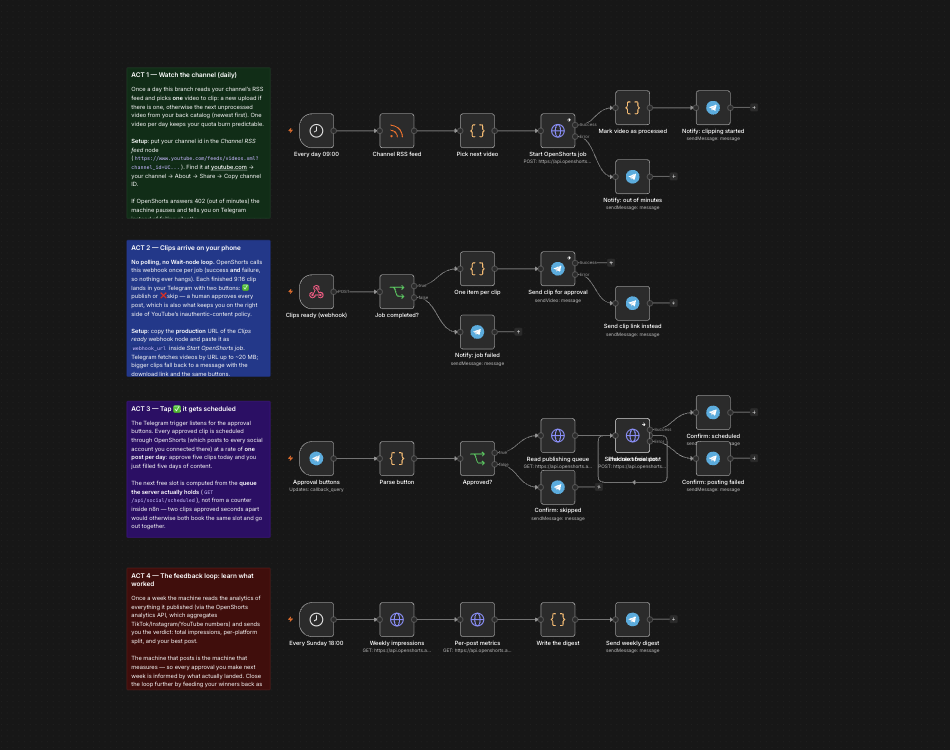
This workflow runs a YouTube channel on its own without handing over the publish button. Once a day it reads your channel feed, clips one video into vertical shorts, and sends each finished clip to your Telegram with Publish and Skip buttons. What you approve is scheduled one post per day to the accounts you connected, and every Sunday it reports back what the published clips actually did. Two credentials, no polling loop, no TikTok or Instagram OAuth app.
Download the workflow
The JSON lives in the project repository, not behind an email form:
- openshorts-content-machine.json — the full four-stage machine described below.
- openshorts-clip-and-notify.json — the minimal version: a form takes a video URL, a signed webhook returns the clips.
- Setup notes — credentials, the webhook secret, and the known limits.
In n8n: Workflows → Import from file, then fill in your channel id and chat id where the sticky notes on the canvas say so.
What the workflow actually does
Four stages, all on one canvas:
- Watch the channel. A daily schedule trigger reads
youtube.com/feeds/videos.xml?channel_id=..., which needs no YouTube API key, and picks one video: your newest upload, or if there is nothing new, the next unprocessed video from your back catalogue. One video a day keeps the minute burn predictable, and a 402 (out of minutes) pauses the machine with a Telegram notice instead of failing silently. - Clip, then get called back. One HTTP request to
/api/processcarrying awebhook_url. When the job ends, OpenShorts POSTs once with the finished clips and durable download links. There is no Wait node anywhere in the workflow. - Approve from your phone. Each 9:16 clip arrives in Telegram as a video message with Publish and Skip buttons. A human approves every post, which is also what separates this from the fully automated pipelines that YouTube's inauthentic-content policy targets.
- Drip-publish and measure. Approved clips take the next free daily slot and post to the accounts you connected in OpenShorts. Every Sunday the workflow reads back the analytics of what it published and sends you impressions, per-platform split and your best post.
Why posting does not need TikTok or Instagram credentials
The usual wall in an n8n video workflow is the publishing half: TikTok
requires an audited app to post publicly, and the Instagram Graph API refuses
anything that is not a public static URL, which is why Google Drive links fail
there. This workflow sidesteps both by posting through
POST /api/social/post against the networks you connected once in
your OpenShorts account. The workflow itself holds no social credentials, and
the clip file is already on durable storage, so the public-URL requirement is
satisfied before Instagram ever sees it.
Scheduling that does not double-book
Approving two clips seconds apart used to be enough to publish them at the
same minute: each execution read the same in-memory counter before either wrote
back. The workflow now asks the server for the queue it actually holds
(GET /api/social/scheduled) and picks the first free slot from it,
which is shared state and cannot race with itself that way. The same endpoint,
plus DELETE /api/social/scheduled/{job_id}, is how you inspect or
cancel a post before it goes out.
What it costs to run
OpenShorts comes in two editions and they are priced very differently, so it is worth being precise. OpenShorts (self-hosted) is free and open source under the MIT licence: Free and open source under MIT. You run it with Docker on your own machine and bring your own API keys. No watermark, no usage cap, no subscription. What it costs you is hardware and time: on a typical CPU an 8-minute video takes 5 to 8 minutes to process. OpenShorts Cloud is the hosted service: The same software with the compute and API keys covered. An NVIDIA GPU clips that same 8-minute video in about 50 seconds. Free plan: the first video is clipped whole up to 60 minutes, then 20 minutes a month, with a watermark and no credit card. Paid plans start at $12/month for 100 minutes with no watermark, up to $59/month.
API calls draw from the same minute balance as the dashboard: no per-call price, no automation surcharge, and no meter at all on the self-hosted edition. Telegram bots are free, and n8n runs wherever you already run it.
Known limits, before you find them the hard way
- Telegram previews a video by URL up to about 20 MB; larger clips arrive as a link message carrying the same approval buttons.
- A YouTube channel RSS feed exposes only the latest 15 videos, so the back-catalogue drip reaches back that far and no further.
- The Telegram Trigger node needs your n8n to have a public https URL, because Telegram registers a webhook against it. A laptop-local n8n can run every other stage, but the approval buttons need a deployed instance or a tunnel.
- Workflow static data, where the machine remembers which videos it already processed, only persists on production executions. Test runs from the editor do not advance it.
Prefer an agent to a workflow?
The same account exposes an MCP server, so Claude, ChatGPT or an n8n AI Agent node can drive the pipeline as tools instead of fixed steps. That surface is documented on the MCP server and API page, and the raw REST loop on the automation page.
Common questions
- Is there a free n8n template to turn long videos into shorts?
- Yes. OpenShorts publishes an MIT-licensed n8n workflow that clips a YouTube channel automatically and posts the approved clips to TikTok, Instagram and YouTube. The JSON is in the project repository with no email gate, and the clipper behind it is open source, so it can run entirely on your own hardware.
- How do I post a video to TikTok or Instagram from n8n?
- Neither platform has a native n8n node, and both have hard requirements: TikTok needs an audited app for public posts and Instagram needs a public static URL for the media. Posting through the OpenShorts API avoids both, because the accounts are connected once in your OpenShorts account and the clip already lives on durable public storage.
- Does the workflow poll for the clipping job to finish?
- No. Clipping a real video takes minutes, so the workflow passes a webhook_url with the job and OpenShorts calls it exactly once when the job reaches a terminal state. Failed jobs fire the same webhook with an error field, so the flow never hangs.
- Can the clips publish without me approving them?
- They can, by connecting the posting step directly to the webhook branch, but the template ships with the approval gate on purpose: unreviewed automated publishing is what YouTube's inauthentic-content policy targets, and one bad clip lands on your own audience.
Sources
- Workflow JSON and setup notes in the project repository at github.com/mutonby/openshorts.
- TikTok and Instagram publishing constraints checked against their developer documentation, August 2026.