
YouTube automation: hand the repetitive work to software, keep the channel yours
"YouTube automation" means two different things. One is faceless channels that mass-produce videos from templates; YouTube demonetises that as inauthentic content. The other is taking the repetitive work off a real channel: cutting every long video into Shorts, writing the metadata, scheduling the posts. This page is about the second.
With OpenShorts there are three ways to automate it: Autopilot in the app (no code), the n8n template (you approve each clip from Telegram), or the REST API and MCP server for your own scripts and for agents like Claude and ChatGPT.
Every new upload clipped on its own, the best clips scheduled one a day if you want. In every paid plan from $12/month.
What is worth automating on a YouTube channel
The work that does not need your judgement, every single week:
- Cutting Shorts from each long video. Finding the moments, reframing to 9:16, adding subtitles. This is the slowest part to do by hand and the easiest to automate well.
- Posting them on a schedule to YouTube Shorts, TikTok and Instagram, one a day instead of all at once.
- The first draft of titles, descriptions and tags. You still edit them; the free tag, title and description generator writes the draft.
- Transcripts for show notes and blog posts, from the transcript generator.
What should stay yours: the long video itself, and the decision to publish. YouTube's monetisation policy was changed on 15 July 2025 to name "inauthentic content", which includes "AI-generated content made with generic or unoriginal templates giving the impression of mass production". Automating the chores of a channel you actually make is not that. Generating the channel is.
Three ways to automate it, from no code to full control
| Route | Who it is for | You approve each post? | What you need |
|---|---|---|---|
| Autopilot | Creators who want it done, no setup | Your choice: autopublish on or off | A paid plan, your YouTube channel connected |
| n8n template | People who already run n8n | Yes, from Telegram | n8n, an OpenShorts API key, a Telegram bot |
| API and MCP | Developers and AI agents | Whatever your code decides | An API key, or a claude.ai / ChatGPT connector |
Route 1: Autopilot, no code
- Sign in to OpenShorts and open the Autopilot tab.
- Connect your YouTube channel.
- Switch Autopilot on, confirm you own the content, and choose how many minutes of each video to clip (10 to 90).
- Optionally switch on autopublish: pick TikTok, Instagram and/or YouTube Shorts, how many clips per video (1 to 5) and the hour to post.
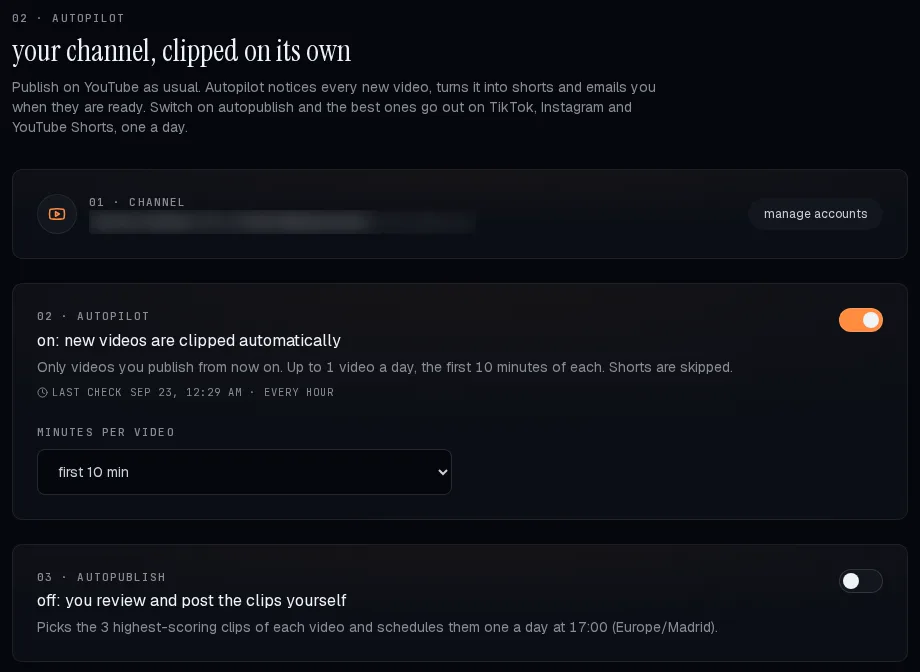
From then on Autopilot looks at your channel about once an hour, starts a job for each new upload it finds and emails you when the clips are ready. The exact rules (one automatic video a day, only new videos, Shorts skipped) are on the auto clip page.
Route 2: the n8n template, with a human in the loop
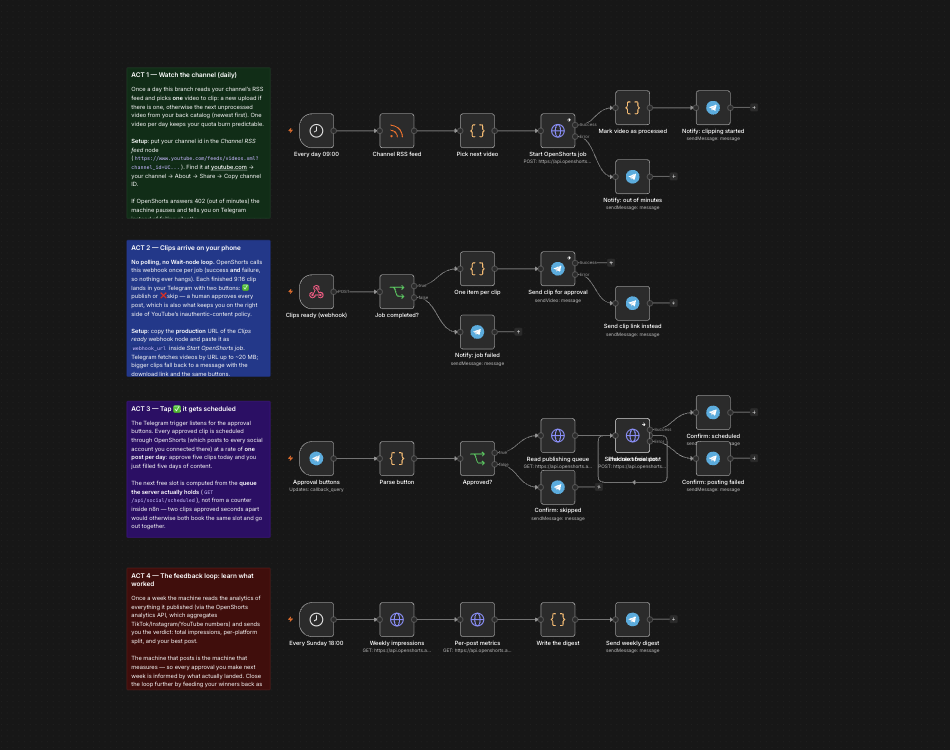
If you run n8n, the free n8n YouTube Shorts template does the same job with one difference that matters: every clip reaches your Telegram with Publish and Skip buttons, and nothing goes out until you tap Publish. It reads your channel's public RSS feed, so it needs no YouTube API key, and a self-hosted OpenShorts works too: change the base URL in the workflow.
Route 3: the API and MCP, for your own code and for agents
Everything the app does is one HTTP call away. POST /api/process
takes a video URL and a webhook_url, and OpenShorts calls you back
once with the finished clips; the details and a working example are on
automate shorts with the API. The same
pipeline is exposed as an MCP server, so Claude, ChatGPT, Cursor or n8n's agent
node can clip and publish when you ask them in plain language.
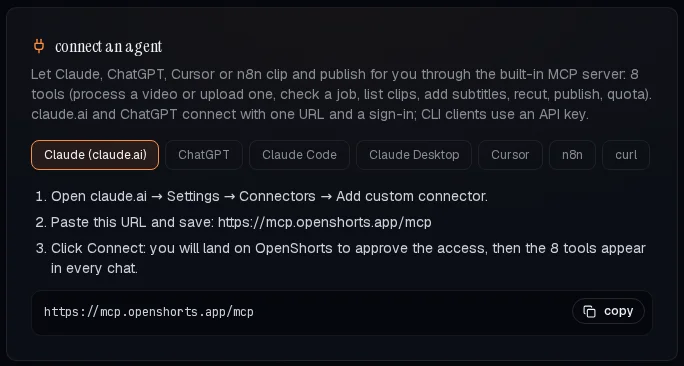
https://mcp.openshorts.app/mcp. The card also has tabs for ChatGPT, Claude Code, Claude Desktop, Cursor, n8n and curl.More on the tools the server exposes on the MCP server page.
What it costs
Autopilot, the API and MCP all use the same minutes as the app: 20 free minutes a month on the free plan (Autopilot itself needs a paid plan), then $12/month for 100 minutes, $29 for 300 or $59 for 750, as of 23 September 2026. Self-hosting the MIT licensed code is free with no minute cap; you pay for your own hardware and API keys.
Common questions
- Is YouTube automation allowed?
- Automating chores on a channel you create is fine. What YouTube does not monetise is inauthentic content: mass-produced, generic or repetitive videos, including AI-generated content made from generic templates. Clipping your own long videos into Shorts is not that.
- Can I automate YouTube Shorts from my long videos?
- Yes. OpenShorts Autopilot clips each new upload on your channel into vertical Shorts with subtitles and can schedule the best ones one a day. The n8n template and the API do the same for people who want to build their own flow.
- Do I need to code?
- No. Autopilot is a switch in the app. The n8n template needs n8n; the API and the MCP server are for developers and AI agents.
- Can an AI agent run my channel with OpenShorts?
- An agent such as Claude or ChatGPT can call OpenShorts over MCP to clip a video, list the clips and publish them. Whether it publishes without asking you is up to how you set it up; the n8n template keeps a human approval step on purpose.
Sources
- YouTube channel monetization policies (inauthentic content, renamed from repetitious content on 15 July 2025), checked 23 September 2026.
- Autopilot rules:
cloud/autopilot.pyin the OpenShorts source; plan prices from the OpenShorts billing API, both checked 23 September 2026.